> For clean Markdown of any page, append .md to the page URL.
> For a complete documentation index, see https://uploadcare.com/docs/llms.txt.
> For AI client integration (Claude Code, Cursor, etc.), connect to the MCP server at https://uploadcare.com/docs/_mcp/server.
# Optimization
> Image and video optimization is essential for improving the performance of your website or application.
Uploadcare helps you optimize images and videos to enhance the performance
of your website or application without sacrificing quality.
* Enable automatic compression by turning on Adaptive quality.
* Automate image responsiveness using the Adaptive image component.
* Adjust video quality using Adaptive bitrate streaming.
## Image
### Compression
By default, [Automatic image format](/docs/compression/#operation-format-auto) conversion (to AVIF or WebP)
and [Adaptive quality](/docs/compression/#smart-compression) are enabled in the
[Delivery section](https://app.uploadcare.com/projects/-/settings/#delivery) of your Dashboard.
These features are applied whenever a URL-based transformation is used (e.g., the
[`-/preview/`](/docs/transformations/image/resize-crop/#operation-preview) operation).
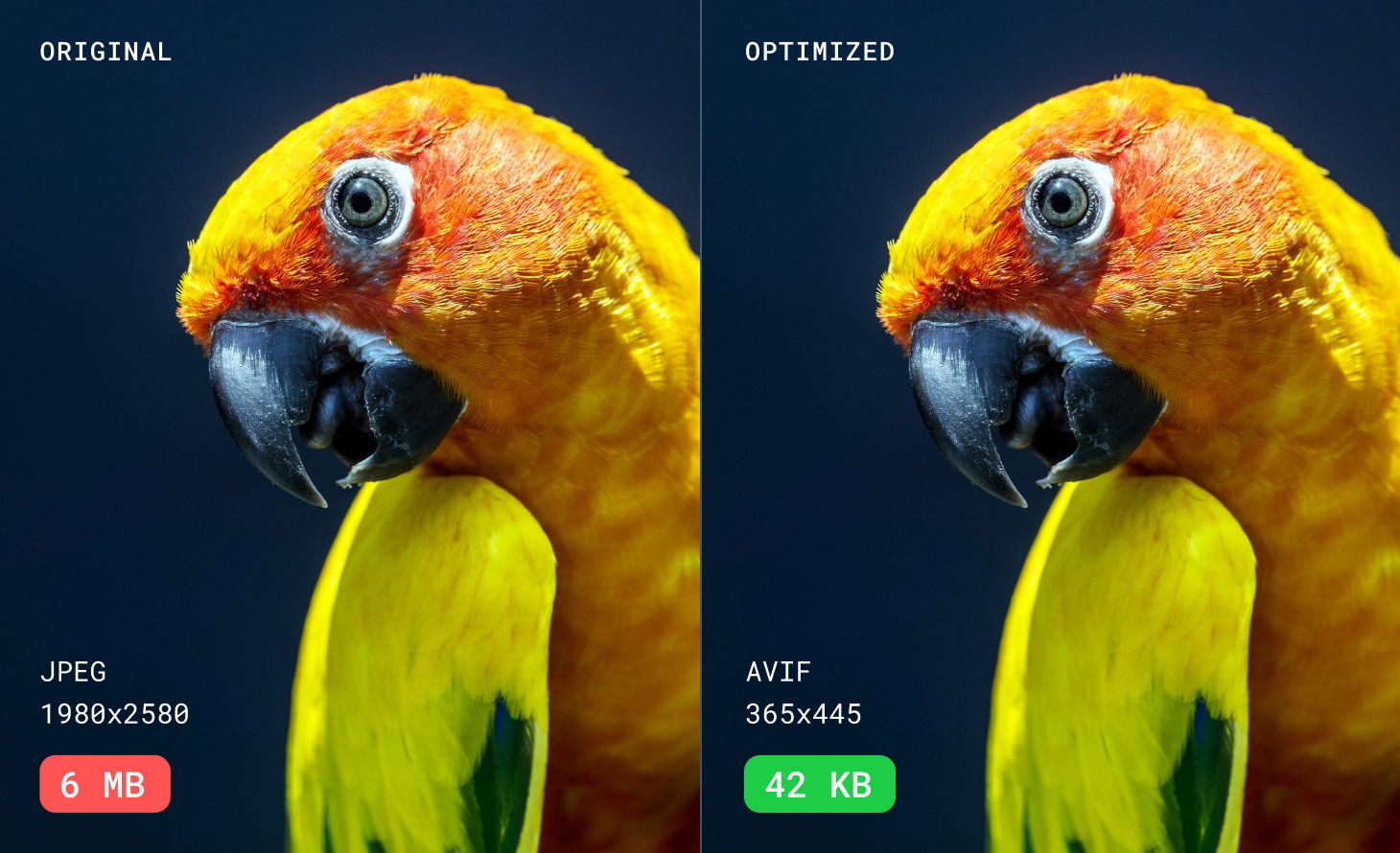
If you need more control over compression settings, refer to [Image compression](/docs/compression/).
### Responsiveness
Optimize images for different devices to ensure a better user experience.

**Automated approach**
Use Uploadcare's [built-in adaptive image web component](/docs/adaptive-image/):
1. Replace the `![]() ` tag with ``.
2. The browser automatically picks the best image size for each device.
This simplifies responsive image handling, prevents layout issues,
and improves load times — ensuring users always see the optimal image.
**Framework integration**
Use Uploadcare with frameworks like [Next.js image loader and component](https://github.com/uploadcare/nextjs-loader)
or [Nuxt](https://image.nuxt.com/providers/uploadcare) to automate responsive image delivery effortlessly.
**Manual approach**
Learn how to [create a responsive image manually](/docs/responsive-images/#make-a-single-image-responsive).
## Video
Adaptive bitrate streaming is enabled by default for new projects.\
For existing projects, you can enable it in the [Dashboard](https://app.uploadcare.com/projects/-/settings/#delivery).
Once enabled, optimization is applied to all video files uploaded to the project.
Learn more about [Adaptive bitrate streaming](/docs/adaptive-bitrate-streaming/).
## Table of Contents \[#toc]
| Article | Description |
| --------------------------------------------------------------- | ------------------------------------------------------------------------------------------------------------------------------------------------------------------ |
| [Image compression](/docs/compression/) | Compression is essential for improving the performance of your website or application. Reducing image size without sacrificing quality is a key factor to consider |
| [Responsive images](/docs/responsive-images/) | Responsiveness ensures images adapt to any device for optimal display across various screen sizes |
| [Adaptive image component](/docs/adaptive-image/) | This web component allows images to automatically adapt to different devices and screen sizes for optimal display |
| [Adaptive bitrate streaming](/docs/adaptive-bitrate-streaming/) | Allows optimized video streaming by dynamically adjusting the video quality based on the viewer's device capabilities and internet connection speed |
` tag with ``.
2. The browser automatically picks the best image size for each device.
This simplifies responsive image handling, prevents layout issues,
and improves load times — ensuring users always see the optimal image.
**Framework integration**
Use Uploadcare with frameworks like [Next.js image loader and component](https://github.com/uploadcare/nextjs-loader)
or [Nuxt](https://image.nuxt.com/providers/uploadcare) to automate responsive image delivery effortlessly.
**Manual approach**
Learn how to [create a responsive image manually](/docs/responsive-images/#make-a-single-image-responsive).
## Video
Adaptive bitrate streaming is enabled by default for new projects.\
For existing projects, you can enable it in the [Dashboard](https://app.uploadcare.com/projects/-/settings/#delivery).
Once enabled, optimization is applied to all video files uploaded to the project.
Learn more about [Adaptive bitrate streaming](/docs/adaptive-bitrate-streaming/).
## Table of Contents \[#toc]
| Article | Description |
| --------------------------------------------------------------- | ------------------------------------------------------------------------------------------------------------------------------------------------------------------ |
| [Image compression](/docs/compression/) | Compression is essential for improving the performance of your website or application. Reducing image size without sacrificing quality is a key factor to consider |
| [Responsive images](/docs/responsive-images/) | Responsiveness ensures images adapt to any device for optimal display across various screen sizes |
| [Adaptive image component](/docs/adaptive-image/) | This web component allows images to automatically adapt to different devices and screen sizes for optimal display |
| [Adaptive bitrate streaming](/docs/adaptive-bitrate-streaming/) | Allows optimized video streaming by dynamically adjusting the video quality based on the viewer's device capabilities and internet connection speed |