> For clean Markdown of any page, append .md to the page URL.
> For a complete documentation index, see https://uploadcare.com/docs/llms.txt.
# Webhook notifications
> You can subscribe to notifications when an event happens in your project using webhooks.
Uploadcare uses webhooks to notify your application about certain events that
occur in your project asynchronously.
For example, you may need to add or update a record in your database when a new
file has been uploaded. When an event happens, we'll make a POST request with a
JSON payload to the endpoint you provided.
Here's the basic delivery flow:
```mermaid
sequenceDiagram
participant Uploadcare
participant Endpoint as Your endpoint
Note over Uploadcare: Event occurs (e.g. file.uploaded)
Uploadcare->>Endpoint: POST with JSON payload
Endpoint-->>Uploadcare: 2xx (success) or non-2xx (failure)
```
Additionally to the information about the file, the payload provides information on what
event triggered it. By identifying the specific source of an event, developers
can easily create rules and workflows that apply to specific scenarios.
Our [REST API webhook](https://uploadcare.com/docs/api/rest/webhook/webhooks-list) is documented in the OpenAPI 3
format. We'll provide links to the respective operations along this guide.
## Event types
Available event types:
| Event | Description |
| ------------------- | ---------------------------------------- |
| `file.uploaded` | A new file has been uploaded |
| `file.info_updated` | `metadata` or `appdata` has been altered |
| `file.deleted` | A file has been removed |
| `file.stored` | A file has been stored |
| `file.infected` | A virus has been detected |
Notes:
* `file.infected` will be deprecated in the next API version in favor of `file.info_updated`.
* REST API v0.6 supports only the `file.uploaded` event.
### file.uploaded
This event always fires when:
* A new file is uploaded to the project.
* [Local copy](https://uploadcare.com/docs/api/rest/file/create-local-copy) is created.
* А new file is created by executing one of the processing operations like:
* [Video encoding](/docs/transformations/video-encoding/)
* [Document conversion](/docs/transformations/file-conversion/)
* [Background removal](/docs/remove-bg/)
### file.info_updated
This event fires for an already uploaded file when its `metadata` field is changed, or
its `appdata` field is updated as a result of executing one of the following add-ons:
* [Object recognition](/docs/object-recognition/)
* [Unsafe content detection](/docs/unsafe-content/)
* [Malware protection](/docs/security/malware-protection/)
The payload will contain a `previous_values` field containing the previous state
of `appdata`/`metadata` along with the new one so that you can compare them.
This allows for a "push" rather than a "pull" approach to getting
a notification when an addon execution is finished.
```json
{
"hook": {
"event": "file.info_updated"
...
},
"data": {
"appdata": {
"uc_clamav_virus_scan": {
"data": {
"infected": true,
"infected_with": "Win.Test.EICAR_HDB-1"
},
"version": "0.104.3",
"datetime_created": "2021-09-21T11:24:33.159663Z",
"datetime_updated": "2021-09-21T11:24:33.159663Z"
}
}
...
},
"previous_values": {
"appdata": {
"uc_clamav_virus_scan": {
"data": {
"infected": false
},
"version": "0.104.2",
"datetime_created": "2021-09-21T11:24:33.159663Z",
"datetime_updated": "2021-09-21T11:24:33.159663Z"
}
}
}
}
```
The `previous_values` object provides information about the type of data that
was updated. By examining the keys within `previous_values`, you can determine
which part of the file's data was added (if the value is null) or updated.
### file.deleted
This event fires when the file is removed. It is a crucial tool to keep information
synchronized between two databases. If a user attempts to access a file that
has been deleted, it can be frustrating and confusing if the file is still
listed as available in the customer's database.
```json
{
"hook": {
"event": "file.deleted",
/* REST HOOK FIELDS */
},
"data": {
"datetime_removed": "2019-07-15T14:41:10.000000Z"
/* REST FILE FIELDS */
}
}
```
### file.stored
This event fires when a file is [stored](/docs/uploads/storage/#file-storing-behavior).
```json
{
"hook": {
"event": "file.stored"
/* REST HOOK FIELDS */
},
"data": {
"datetime_stored": "2018-11-26T12:49:10.477888Z"
/* REST FILE FIELDS */
}
}
```
### file.infected
This event fires when an infected file is detected. It may occur when:
* A newly uploaded file is [scanned automatically](/docs/security/malware-protection/).
* You explicitly [perform a scan](/docs/security/malware-protection/#for-already-uploaded-files)
on an existing file.
```json
{
"hook": {
"event": "file.infected"
/* REST HOOK FIELDS */
},
"data": {
"appdata": {
"uc_clamav_virus_scan": {
"data": {
"infected": true,
"infected_with": "Win.Test.EICAR_HDB-1"
},
"version": "0.104.3",
"datetime_created": "2021-09-21T11:24:33.159663Z",
"datetime_updated": "2021-09-21T11:24:33.159663Z"
}
}
/* REST FILE FIELDS */
},
}
```
## Webhook payload structure \[#payload-structure]
Regardless of the event type, the
[webhook payload object](https://uploadcare.com/docs/api/rest/webhook/create) has the following
common properties:
| Key | Type | Description |
| ----------- | -------- | -------------------------------------------------------------- |
| `initiator` | `object` | Contains a "link" to the entity that initiated the webhook |
| `hook` | `object` | Contains information about the webhook, event, and the project |
| `data` | `object` | Contains information about the file the event occurred with |
| `file` | `string` | Contains a CDN URL of the file the event occurred with |
Check out [webhook API reference](https://uploadcare.com/docs/api/rest/webhook/create) to see
callback schemas for different events.
### Difference between v0.6 and v0.7
Depending on the version, the `data` object in the payload will have
a different structure. When using v0.7, the `data` object will have
three additional keys: `appdata`, `content_info`, `metadata`.
| Key | Type | Description |
| -------------- | -------- | --------------------------------------------------------------------------------------------------------------------------------------------------------------------------------- |
| `appdata` | `object` | Contains information updated when [add-ons](https://uploadcare.com/docs/api/rest/add-ons/aws-rekognition-execute) are launched: antivirus, object recognition, background removal |
| `content_info` | `object` | Contains information about the file type. The object will include detailed image/video metadata for images and videos |
| `metadata` | `object` | Contains custom metadata keys. See [Metadata](/docs/file-metadata/) for more details |
`initiator` is also introduced in REST API v0.7.
## Identifying event cause
The field `initiator` identifies the source or cause of the event that
triggered the webhook. It contains `type` and `detail`.
```json
{
"initiator": {
"type": "addon",
"detail": {
"addon_name": "zencoder_convert_video",
"request_id": ":request_id",
"source_file_uuid": ":UUID"
}
}
}
```
`type`:
* `addon`: an event initiated by one of the [add-ons](https://uploadcare.com/docs/api/rest/add-ons/aws-rekognition-execute)
(e.g. video encoding).
* `api`: initiated by any other API request (e.g. file upload).
* `system`: initiated by our platform (e.g. file expired and was removed
automatically)
`detail`:
* `addon_name`: if `type` is `addon`, then an additional field will tell you
what exact add-on it was.
* `request_id`: a reference to the request in [access logs](https://app.uploadcare.com/projects/-/api-logs/) (null, if
initiator is `system`).
* `source_file_uuid`: if the file is derivative (e.g. encoded from another
video file), it will provide its UUID.
This information provides context and information about the event, such as who
or what caused it and what action was taken. This is useful for developers who
want to automate certain tasks based on specific events or conditions.
For example, if a new file was uploaded as a result of background removal, the
`initiator` field can be used to identify the add-on that triggered the event.
Use it to notify a specific user or update a database with
new information.
Explore [the callback section](https://uploadcare.com/docs/api/rest/webhook/create) in webhooks API
reference to learn more about it.
## Usecase example
For example, you want to set up a user-generated content moderation system.
When a third-party user uploads a file, you want to ensure that the file does
not contain viruses or inappropriate content such as violence or drugs.
To check files, you need to:
* Create a handler that accepts the webhook when a file is uploaded. Virus
scanning is automatically launched during the upload process, so no additional
actions are required.
* Create a handler to receive the webhook in case a virus is detected by
malware protection system.
* Create a handler that accepts the webhook when the file information is
updated. Depending on your goals, this handler can process the received
information using logical statements to determine which type of data is
sensitive.
Here's how those three handlers fit together for this scenario:
```mermaid
sequenceDiagram
participant Uploadcare
participant App as Your app
Note over Uploadcare: File uploaded
Uploadcare->>App: POST file.uploaded
Note over Uploadcare: Malware scan runs automatically
alt Virus detected
Uploadcare->>App: POST file.infected
end
App->>Uploadcare: Launch unsafe content detection
Uploadcare->>App: POST file.info_updated
(appdata moderation labels)
Note over App: Check moderation labels,
decide whether to remove the file
```
The `previous_values` object provides information about the type of data that
was updated. By examining the keys within `previous_values.appdata`, you can
determine what information was added (if the value is null) or updated (if the
value is not null).
To determine if an image contains something that you would like to avoid, you
can perform a simple check:
```python
moderation_labels = appdata['aws_rekognition_content_moderation']['ModerationLabels']
for label in moderation_labels:
if label["ParentName"] == "Tobacco Products" and label["Confidence"] > 50:
# Do something
```
Next, launch the [unsafe content detection](/docs/unsafe-content/). Once the
processing is finished, the moderation labels will be added to the file's
application data and the webhook will be sent.
Then you can decide which action is required in such a case. For example, the
file can be removed.
## Configuring endpoints
Endpoints can be configured in the [Dashboard](https://app.uploadcare.com/)
or via the [REST API webhook](https://uploadcare.com/docs/api/rest/webhook/webhooks-list).
We recommend using the UI in the [Webhooks section](/docs/webhooks/#webhook-notifications)
as a more convenient option.
Enter a URL of your webhook endpoint that Uploadcare will send
notifications to.
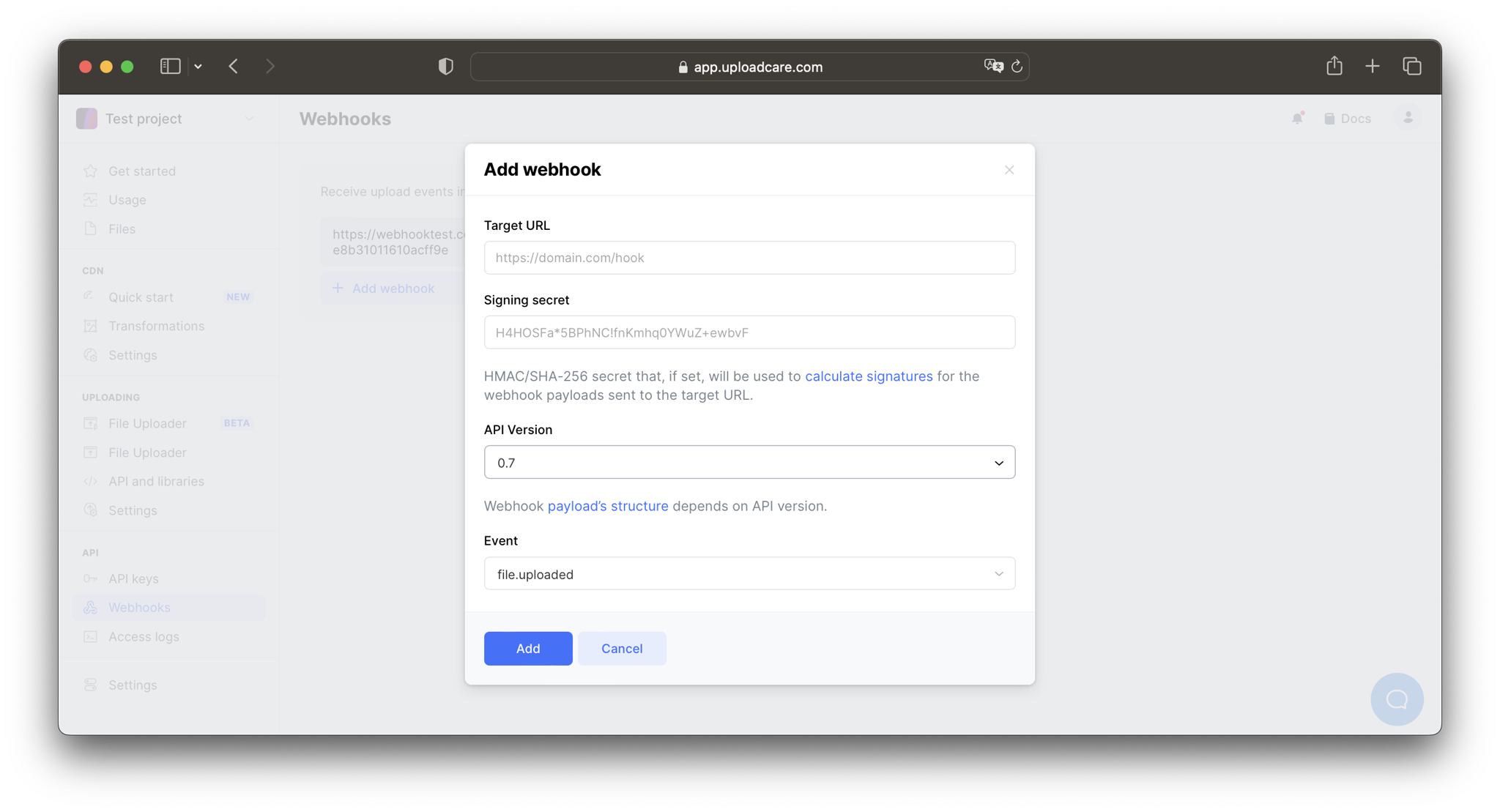
If you want Uploadcare to sign the requests, enter a signing secret key.
See [Signed webhooks](#signed-webhooks) for more details.
Also, you'll be prompted to choose the API version.
Depending on the version, different sets of events will be available
for subscription. The later the version, the more events it supports.
The [payload structure](#payload-structure) also depends on the API version.
Consider using the latest API version whenever possible.
The same webhook endpoint can be added multiple times to receive
notifications about different events. Also, you can add multiple
different endpoints for the same event type.
## Handling requests from Uploadcare
Uploadcare will submit requests to your app's webhook endpoint,
which is no different from any other route in your application.
When your application receives a request from Uploadcare,
it can do various things, like adding a record about a newly uploaded
file to your database or other types of tasks.
When configuring your webhook receiver, keep in mind that if your
server doesn't respond with `2xx`, the request attempt will timeout
after one minute, and our system will retry it.
Here's how the retry mechanism works:
| Retry # | Timing |
| -------------------- | ---------------------------------- |
| Retry #1 | 1 minute after the first attempt |
| Retry #2 | 5 minutes after the first attempt |
| Retry #3 | 10 minutes after the first attempt |
| Retry #4 | 30 minutes after the first attempt |
| Retry #5 | 60 minutes after the first attempt |
| Retry #6 and further | Once an hour within 72 hours |
### Automatic deactivation
If all delivery attempts fail within the retry window (\~72h), the webhook is automatically disabled. An email notification is sent to the project owner. Reactivation is manual via Dashboard or API.
> **Note**
>
> **Note:** Uploadcare treats only `2xx` responses as success. All other statuses (including `4xx`, `5xx`, and timeouts) are considered unsuccessful.
> If you expect this to cause problems in your workflow, consider
> doing the work in an asynchronous task so that your application
> can immediately respond with a `2xx` to the request.
## Handling webhooks locally
If your application runs on a local machine, and its webhook endpoints
have URLs like `https://localhost:3000/hooks`, you'll
need to create a secure tunnel to this port on your machine to expose
it to the Internet.
Consider using [Ngrok](https://ngrok.com) or similar tools to accomplish this.
We recommend setting up separate [projects](/docs/start/settings/) for
the development/staging/production environments and configuring
webhooks accordingly.
## Signed webhooks
Each webhook payload can be signed with a secret to ensure that the request
comes from the expected sender. The resulting signature is included in the
request header, so you can use it to validate that the request comes from Uploadcare.
### Setting your signing secret
Set up your secret token in two places: Uploadcare and your server.
In Uploadcare, a signing secret can be added with a **POST** request when
[creating](https://uploadcare.com/docs/api/rest/webhook/create) or
[updating](https://uploadcare.com/docs/api/rest/webhook/update-webhook) a webhook:
```bash
curl -X POST \
-H "Content-Type: application/json" \
-H "Authorization: Uploadcare.Simple $YOUR_PUBLIC_KEY:$YOUR_SECRET_KEY" \
-d '{"signing_secret": "some-secret"}' \
"https://api.uploadcare.com/webhooks/WEBHOOK_ID/"
```
Get `$YOUR_PUBLIC_KEY` and `$YOUR_SECRET_KEY` from [API keys](https://app.uploadcare.com/projects/-/api-keys/).
*Note: Here we use a simple authorization scheme for clarity. Stick to the
[Uploadcare auth scheme](https://uploadcare.com/docs/api/rest/#authentication) in the production code.*
The signing secret can be added in [Dashboard settings](https://app.uploadcare.com/accounts/settings/) on
the Webhooks page.
To get a [list of webhooks](https://uploadcare.com/docs/api/rest/webhook/webhooks-list) and their IDs in a
project, you can make a **GET** request:
```bash
curl -L "https://api.uploadcare.com/webhooks/" \
-H "Authorization: Uploadcare.Simple $YOUR_PUBLIC_KEY:$YOUR_SECRET_KEY"
```
Set up an environment variable on your server that stores the secret:
```bash
export UC_SIGNING_SECRET=your_signing_secret
```
### Validate payload
Uploadcare uses the set secret token to create a hash signature that will be
added to each request to your webhook endpoint with the `X-Uc-Signature` header.
The signature is generated with [HMAC/SHA-256](https://en.wikipedia.org/wiki/HMAC) algorithm, and
the header has the following format: `X-Uc-Signature: v1=SIGNATURE`.
An example of signature verification in Python:
```python
import hashlib
import hmac
import os
UC_SIGNING_SECRET = os.environ['UC_SIGNING_SECRET']
# see payload example in callbacks section of
# https://uploadcare.com/docs/api/rest/webhook/create/
webhook_body = '''{...}'''
# example of a X-Uc-Signature HTTP header value
x_uc_signature_header = (
"v1=f4d859ed2fe47b9a4fcc81693d34e58ad12366a841e58a7072c1530483689cc0"
)
calculated_signature = (
"v1="
+ hmac.new(
UC_SIGNING_SECRET.encode("utf-8"),
webhook_body.encode("utf-8"),
hashlib.sha256
).hexdigest()
)
print("x_uc_signature_header", x_uc_signature_header)
print("calculated_signature", calculated_signature)
if calculated_signature in x_uc_signature_header:
print("WebHook signature matches!")
else:
print("WebHook signature mismatch!")
```
## API integrations \[#integrations]
You don't have to code most of the low-level API integrations.
We have high-level libraries for all popular platforms:
* [JavaScript](/docs/integrations/javascript/)
* [PHP](/docs/integrations/php/)
* [Python & Django](/docs/integrations/python/)
* [Ruby](/docs/integrations/ruby/)
* [Rails](/docs/integrations/rails/)
* [Java](/docs/integrations/java/)
* [Golang](/docs/integrations/golang/)
* [Rust](/docs/integrations/rust/)
* [Swift](/docs/integrations/swift/)
* [Android](/docs/integrations/android/)