Speculation Rules API: The new alternative to prerender
The Speculation Rules API lets you make page navigation feel instant by prerendering likely next pages in the background before the user clicks. If you run a content-heavy or multi-page site, an e-commerce store, a blog, or a multi-step funnel, adding a single JSON block to your HTML can cut navigation time to single-digit milliseconds with no effect on users with low memory or data-saver mode enabled.
This guide covers how the API works, how it differs from traditional <link rel="prefetch"> and <link rel="prerender"> techniques,
and how to configure rules effectively for your site.
To follow along with the examples, you can use this Speculation Rules API demo,
which lets you test different rules and see how they affect navigation performance in real time.
What is the Speculation Rules API?
The Speculation Rules API is a new web API that lets you declare, using a JSON-based syntax, which pages the browser should proactively prefetch or prerender ahead of future navigation.
Instead of waiting for the user to click a link to navigate, the browser uses your predefined rules to load and render likely next pages in the background, so when the user navigates, the page is ready to display immediately.
Traditional resource hints like <link rel="prefetch">
require you to hardcode specific URLs in your HTML and only download the raw document without executing JavaScript or applying styles.
The Speculation Rules API goes further by supporting full prerendering, URL pattern matching,
and configurable eagerness levels that control precisely when the browser starts working in a declarative manner.
For example, you can set a rule to prerender any product page the user hovers over, while prefetching blog posts conservatively only when the user clicks. The browser manages these rules intelligently based on device memory, network conditions, and user behavior, so you get performance benefits without overloading the user’s device.
A simple example of the Speculation Rules API in action looks like this:
<script type="speculationrules">
{
  "prerender": [
    {
      "where": {
        "and": [
          { "href_matches": "/product/*" },
          { "not": { "href_matches": "/product/*/admin" } },
          { "not": { "selector_matches": "[rel~=nofollow]" } }
        ]
      },
      "eagerness": "moderate"
    }
  ],
  "prefetch": [
    {
      "where": { "href_matches": "/blog/*" },
      "eagerness": "conservative"
    }
  ]
}
</script>
Chrome introduced the Speculation Rules API to replace the Chrome-only <link rel="prerender"> tag,
which it deprecated and removed because it consumed too much memory and network bandwidth.
One important boundary to understand upfront: the Speculation Rules API targets document URLs,
not individual subresources like images or scripts.
For subresource prefetching, you still need to use the <link rel="prefetch"> resources hint.
The API handles the full next-page navigation, not the assets within a page.
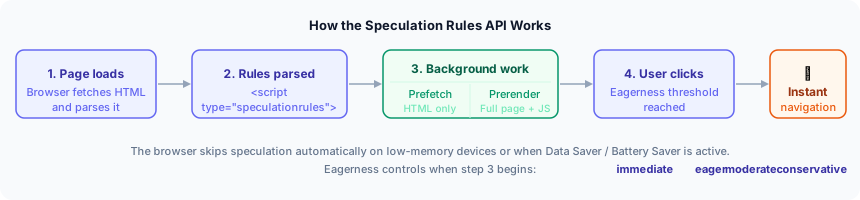 The speculation lifecycle — from page load to instant navigation
How prefetch and prerender traditionally work
Before the Speculation Rules API, you had two main options for hinting to the browser that you might need a resource soon.
The prefetch: <link rel="prefetch">
Tells the browser to download a resource during idle time and cache it for future use. When you apply it to an HTML document, it downloads the page’s HTML but does nothing else: no JavaScript execution, no stylesheet application, no subresource loading.
<link rel="prefetch" href="/about" />One benefit of prefetch is that it reduces the time-to-first-byte (TTFB)
on the next navigation because the HTML is already in the cache,
but the browser still has to do all the rendering work when the user actually clicks the link.
It also does not work for cross-site navigations, and Cache-Control headers can prevent it from caching.
The prerender: <link rel="prerender">
The prerender hint aimed to do a full, invisible load of a page and execute JavaScript so it would appear instantly on navigation. In practice, the original implementation was expensive, frequently caused bugs on pages with side effects, and consumed a lot of memory.
<link rel="prerender" href="/next-page">Subsequently, Chrome introduced the NoState Prefetching API to allow prefetching of the HTML document without executing JavaScript to save memory, but it also meant that pages that relied on JavaScript to load critical content would still need to be rendered from scratch on navigation, losing the instant navigation benefit.
While both techniques can improve performance when used correctly, they have significant limitations.
With hardcoded <link> tags, you have no control over which URLs to target without manually listing them,
and you cannot adjust based on user behavior or device conditions.
Speculation Rules API vs prefetch vs prerender
The table below compares the three approaches across the dimensions that matter most for performance decisions.
<link rel="prefetch"> | <link rel="prerender"> | Speculation Rules API | |
|---|---|---|---|
| What it loads | HTML only | Full page (deprecated) | Prefetch: HTML only Prerender: full page |
| JS execution | No | Yes (page rendered, JS runs and can have side effects) | Prefetch: No Prerender: Yes |
| Dynamic rules | No | No | Yes |
| Eagerness control | No | No | Yes |
| URL pattern matching | No | No | Yes (Chrome 121+) |
| Cross-site support | No | No | Prefetch: Yes (limited) Prerender: No |
| Cache-Control bypass | No | No | Yes |
| Battery/Data Saver aware | No | No | Yes |
| Browser resource awareness | No | No | Yes |
| Chrome support | Yes | Sunsetting | Prefetch: 110+ Prerender: 105+ |
| Safari | Yes | No | 26.2 (disabled by default) |
| Firefox | Yes | No | Not yet |
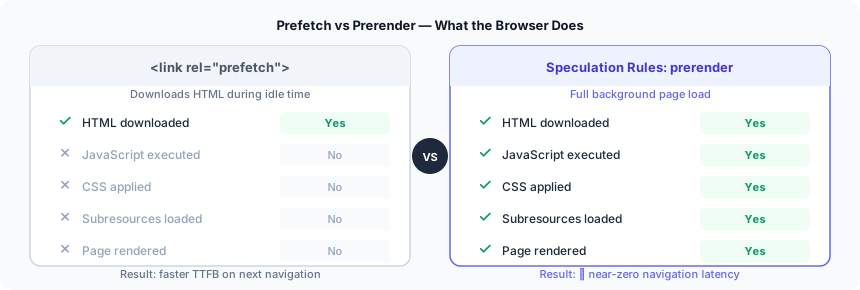 Prefetch vs prerender — what the browser loads and executes
One major difference between the speculation rules API vs script-based preloading is that the Speculation Rules API is declarative and browser-managed. The browser decides whether to honor a rule based on available memory, network conditions, and CPU load.
With hardcoded <link> tags, the browser has less context and cannot be as smart about what it actually executes.
How the Speculation Rules API works
To use the speculation API, you need to define speculation rules by adding a <script> tag with type="speculationrules" to your page.
Inside this script tag, write the JSON object with prefetch and/or prerender arrays, each containing rule objects.
The Speculation Rules API supports two main actions: prefetch and prerender.
Each action has its own set of rules that you can configure with different conditions and eagerness levels.
-
Prerender rules tell the browser to load and render a page in the background, so it can activate instantly on navigation.
-
Prefetch rules tell the browser to download the HTML document in advance, reducing TTFB on navigation, but without executing JavaScript or applying styles until the user clicks.
Feature detection
Before adding speculation rules, you should always check whether the browser supports them and fall back gracefully:
if (
  HTMLScriptElement.supports &&
  HTMLScriptElement.supports('speculationrules')
) {
  const specScript = document.createElement('script');
  specScript.type = 'speculationrules';
  specScript.textContent = JSON.stringify({
    prefetch: [{ urls: ['/next.html'] }],
  });
  document.body.append(specScript);
} else {
  // Fallback for browsers that don't support speculation rules
  const linkElem = document.createElement('link');
  linkElem.rel = 'prefetch';
  linkElem.href = '/next.html';
  document.head.append(linkElem);
}
This way, you are using the API as a progressive enhancement: Chrome users get speculation rules,
and everyone else falls back to <link rel="prefetch"> if their browsers do not support the Speculation Rules API.
Speculating on a list of URLs
The simplest version uses a urls array. This works in Chrome 109+ and Edge 109+:
<script type="speculationrules">
{
  "prerender": [
    {
      "urls": ["/page-a.html", "/page-b.html"]
    }
  ],
  "prefetch": [
    {
      "urls": [ "/page-c.html" ]
    }
  ]
}
</script>
The browser reads this when it parses the page and begins prerendering those URLs in a hidden tab. If the user navigates to one of them, the pre-rendered version activates instantly.
To see how this works in practice, the demo below uses the demo application mentioned earlier in this article to show how the browser prerenders the Shop and Features pages when the user hovers over their links, and prefetches the Our Story page only when the user clicks on the link.
The result is instant navigation to the Shop and Features pages, and a faster navigation to the Our Story page compared to the page with no speculation (News) at all.
Speculation Rules API demo — hover to prerender, click to prefetch
Notice how the browser fires up a prerendering request for the Shop and Features pages as soon as the user hovers over their links,
but waits until the user clicks the Our Story link to start prefetching it.
This is because of the eagerness level configured for the demo.
The Eagerness levels section below goes into more detail about how to use eagerness to control when the browser starts speculation.
Using URL pattern matching with logical operators and the where property
For more complex scenarios, you can use logical operators like and,
and not within a where property to create rules that match URL patterns and exclude certain paths or elements.
This requires Chrome 121+ and Edge 121+:
<script type="speculationrules">
{
  "prerender": [
    {
      "where": {
        "and": [
          { "href_matches": "/product/*" },
          { "not": { "href_matches": "/product/*/admin" } },
          { "not": { "selector_matches": "[rel~=nofollow]" } }
        ]
      },
      "eagerness": "moderate"
    }
  ],
  "prefetch": [
    {
      "where": { "href_matches": "/blog/*" },
      "eagerness": "conservative"
    }
  ]
}
</script>
In the code above:
- The
whereproperty allows you to specify complex conditions for when to apply the prerender or prefetch action - The
andoperator lets you combine multiple conditions - The
notoperator lets you exclude certain URLs or elements from speculation - The
href_matchescondition matches URLs based on a simple pattern (e.g.,/product/*matches any URL that starts with/product/) - The
selector_matchescondition matches elements in the page based on CSS selectors (e.g.,[rel~=nofollow]matches any element with arelattribute that contains the wordnofollow)
You can match URLs, exclude specific paths, and exclude elements marked with CSS selectors like [rel~=nofollow].
This makes it practical to prerender an entire product catalog section
while excluding pages that should not be speculatively loaded (like sign-out or add-to-cart URLs).
Eagerness levels
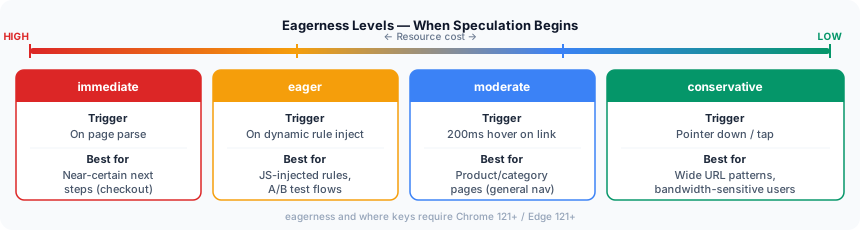 The four eagerness levels — from immediate to conservative
The eagerness property controls when the browser starts a speculation. It accepts four values:
-
immediate: The browser starts speculation as soon as it parses the rule, without waiting for any user interaction. -
eager: The browser speculates at the first hint of user intent: moving the mouse toward a link, briefly focusing it, or pausing while it is visible on screen. -
moderate: The browser waits for a clearer signal before starting. Specifically, the user scrolls a link into view and then hovers or focuses it for a moment. It strikes a balance between speculating early enough to be useful and not wasting resources on links the user is only passing through. -
conservative: The browser holds off until the user actively starts clicking or tapping the link (themousedownorpointerdownevent). It uses the fewest resources of the four levels and is the default for document-based (where) rules.
To see how eagerness levels affect the speculation API behavior, open DevTools in your Chromium-based browser and navigate to the “Applications” tab and look for the “Speculative loads” section.
Here you will find the rules and speculations defined on the page, along with their current status (e.g., “Not triggered”, “Running”, “Ready”).
Chrome DevTools Speculative Loads panel showing rules and their statuses
Notice how the status of the speculations are currently “Not triggered” but when you hover through them they go to “Running” and “Ready” and if you click on the link they load instantly.
This is because the demo application uses eager eagerness for the prerender rules,
which means the browser starts prerendering as soon as the user hovers over the link, or stops scrolling where the link is visible.
Adding rules dynamically via JavaScript
You can inject speculation rules at runtime to adapt them based on user behavior or A/B test conditions:
const script = document.createElement('script');
script.type = 'speculationrules';
script.textContent = JSON.stringify({
  prerender: [{ urls: ['/checkout'] }],
});
document.head.appendChild(script);
Dynamically added rules use eager eagerness by default.
Delivering rules via HTTP header
Aside from using an inline <script> tag,
you can also deliver speculation rules via the Speculation-Rules HTTP response header pointing to a JSON file:
Speculation-Rules: "/rules/prefetch.json"You must serve the JSON file with the application/speculationrules+json MIME type.
Rules from both the header and inline scripts apply simultaneously; the browser merges them.
If your site uses a Content-Security-Policy with script-src,
add 'inline-speculation-rules' to allow the inline <script type="speculationrules"> tag:
Content-Security-Policy: script-src 'self' 'inline-speculation-rules';When to use Prefetch vs Prerender in Speculation Rules
Both actions are available in the API, but they serve different situations.
Use prefetch when:
-
The next page is likely but not certain.
-
The page has server-side personalization or session-dependent content that could cause issues if prerendered ahead of time. Since prerendering runs JavaScript, it may trigger API calls or analytics events before the user has actually viewed the page.
-
Device memory or bandwidth is a concern. Prefetch is lighter than prerender.
Use prerender when:
-
You have high-confidence in the likelihood of a user visiting the page, such as the next step in a linear flow (sign-up step 1 to step 2, or a product page to its checkout page).
-
The page does not have side effects from early JavaScript execution, such as premature analytics hits, auto-play media, or session mutations.
-
The target is a same-origin URL. The API restricts prerendering to same-origin documents by default. Cross-origin same-site prerendering requires the target page to opt in with the
Supports-Loading-Mode: credentialed-prerenderresponse header. Cross-site prerendering is not supported.
Detecting prerendered and prefetched pages
Knowing whether the browser prefetched or prerendered a page lets you handle analytics, side effects, and stale content correctly.
Server-side detection
Both prefetch and prerender requests include a Sec-Purpose header that you can inspect on the server:
/* Prefetch request */
Sec-Purpose: prefetch

/* Prerender request */
Sec-Purpose: prefetch;prerender
Use this header to defer server-side actions that should only run when the user actually views the page, like writing session data or triggering server-side analytics. If you return a non-2xx status code from a speculated request, the browser cancels the prefetch or prerender.
Client-side detection
For prerendered pages, the document.prerendering property returns true while the page is in the background.
The prerenderingchange event fires when the user actually views the page:
if (document.prerendering) {
  document.addEventListener('prerenderingchange', initAnalytics, {
    once: true,
  });
} else {
  initAnalytics();
}
With this guard in place, analytics and other side-effecting code only run when the user has actually viewed the page, not during background prerendering.
For prefetched pages, check PerformanceResourceTiming.deliveryType:
if (
  performance.getEntriesByType('navigation')[0].deliveryType ===
  'navigational-prefetch'
) {
  // your custom handler
  respondToPrefetch();
}
To detect whether the browser prerendered a page and when the activation happened,
you can use the PerformanceNavigationTiming.activationStart:
function pageWasPrerendered() {
  return (
    document.prerendering ||
    self.performance?.getEntriesByType?.('navigation')[0]?.activationStart > 0
  );
}
When not to use the Speculation Rules API
Not every page is safe to prefetch or prerender. Before adding speculation rules to a URL, check if the page has any of the following.
-
Pages with server-side actions: Pages that trigger a side effect when fetched are unsafe to speculate on. E.g sign-out URLs (which would log the user out silently), sign-in flow URLs that send an OTP. For these, check the
Sec-Purposeheader on the server and skip the side effect if the request is speculative. -
Pages with client-side state changes: If a prerendered page runs JavaScript that writes to
localStorage,IndexedDB, or triggers analytics on load, it may modify application state before the user has viewed the page. Usedocument.prerenderingor listen forprerenderingchangeto defer these operations until after activation. -
Dynamically changing server content: A page prerendered five minutes before the user views it may show stale content. Chrome caches prefetches for up to 5 minutes before discarding them.
-
Third-party analytics and ad scripts: Many third-party scripts are not prerender-aware. Loading them during prerendering can result in duplicate page view hits or incorrect ad impressions. For scripts you cannot control, delay loading them until after activation using
prerenderingchange.
Note: Cross-origin <iframe> loading is automatically delayed until prerender activation,
which means most third-party ad and widget iframes are safe by default.
Performance implications and Core Web Vitals
The Speculation Rules API has a direct and measurable impact on Core Web Vitals, particularly on subsequent navigations after the initial page load.
-
Largest Contentful Paint (LCP) benefits most from prerendering. When a page is already fully rendered before the user clicks, the LCP element is immediately visible. In practice, LCP times on prerendered pages can drop into the single-digit millisecond range in ideal conditions, compared to the 1–3 second range typical of a cold navigation.
-
First Contentful Paint (FCP) and Time to Interactive (TTI) also improve with prerender. The browser has already executed JavaScript and applied styles, so neither metric requires work at navigation time.
-
Interaction to Next Paint (INP) benefits indirectly. A faster navigation reduces the perceived sluggishness associated with waiting for the next page to load, even if INP measures responsiveness within a single page’s lifecycle.
-
Prefetch delivers a narrower but still meaningful gain. It eliminates network time for the HTML document, reducing TTFB and giving the browser a head start on parsing and subresource discovery.
An important detail: the browser will not honor speculation rules on devices under memory pressure or on connections where the user has enabled data saver or battery saver mode. The API respects these signals, which means adding speculation rules does not harm users on constrained devices. The browser simply skips the speculation and falls back to normal navigation.
Who benefits from the Speculation Rules API
The Speculation Rules API delivers the largest gains where navigation patterns are predictable and pages are server-rendered or statically generated. Here is how it maps to common application types:
-
E-commerce sites see the highest impact. The listing to product detail to checkout flow is one of the most predictable navigation patterns on the web, and prerendering
/checkoutwithmoderateeagerness means the page is already loaded by the time the user clicks the “Buy” button. -
Content and media sites (blogs, news outlets, and documentation portals) have predictable reading flows that make
conservativeprefetch a low-cost win with no risk of over-speculating. -
Multi-step flows such as onboarding sequences, sign-up funnels, and multi-page forms have only one likely next destination per step, making them ideal for
immediateprerender. -
Server-rendered and hybrid architectures (Next.js pages router, Nuxt, Astro, Rails, Django) benefit most because every route change triggers a real HTML fetch that speculation rules intercept speculatively.
Speculation rules handle the navigation layer of performance. How quickly your images, media, and other assets render after the page activates depends equally on your delivery stack.
Pairing speculation rules with a fast CDN means users get both instant page transitions and fast asset loads. Uploadcare’s image CDN covers that delivery side: automatic format conversion, adaptive resizing, and edge caching, so every asset on your prerendered pages loads just as quickly as the navigation itself.
FAQ
What is the Speculation Rules API?
The Speculation Rules API is a browser feature that lets developers declare, in JSON,
which pages the browser should prefetch or prerender before the user navigates to them.
It provides more flexibility and browser-awareness than traditional <link rel="prefetch"> resource hints,
including support for URL patterns (Chrome 121+), configurable eagerness levels, and full-page prerendering with JavaScript execution.
Is the Speculation Rules API better than prefetch?
For most navigation use cases, yes.
The API supports both prefetch (downloading HTML in advance)
and full prerender (loading and rendering the complete page including JavaScript), while <link rel="prefetch"> only handles the former.
The API also adds URL pattern matching, configurable eagerness, cross-site prefetch support, Cache-Control bypass,
and browser-managed resource awareness that respects Battery Saver and Data Saver modes.
Does the Speculation Rules API replace prerender?
It replaces the deprecated <link rel="prerender"> tag, which Chrome is sunsetting.
The prerender action in the Speculation Rules API is more capable: it loads subresources fetched via JavaScript (the old tag did not),
the browser applies resource checks before honoring the rule, and you can tune eagerness to avoid prerendering pages the user is unlikely to visit.
Which browsers support the Speculation Rules API?
Chrome and Edge (both Chromium-based) have the broadest support.
The prerender key is available from Chrome 105 and Edge 105.
The prefetch key is available from Chrome 110 and Edge 110.
The eagerness and where (pattern matching) keys require Chrome 121 and Edge 121.
Safari 26.2 includes support but has it disabled by default. Firefox does not yet support the API.
Unsupported browsers silently ignore the <script type="speculationrules"> tag,
making the API safe to add as a progressive enhancement.