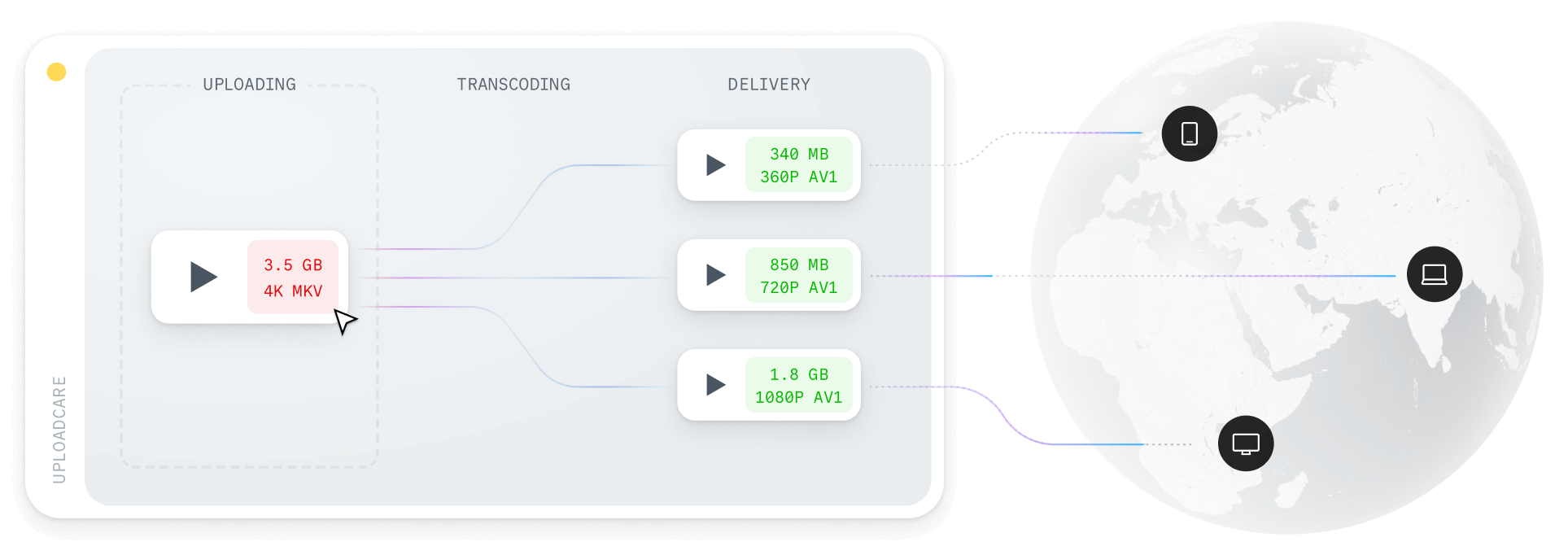
The best video CDN depends on how video fits your product:
Uploadcare for an all-in-one media stack, Cloudflare Stream or Mux for video-first apps,
Wowza for live broadcasting, and Vimeo for no-code hosting.
This guide compares all five on features, pricing, and performance so you can match one to your use case.
Video is the heaviest asset most apps deliver, so when its playback is slow or stutters, users notice immediately.
One study found that including video on a landing page can increase conversions by up to 80%,
but only if the video plays smoothly. The key to this smooth experience lies in the quality of the CDN delivering the content.
Quick picks
- All-in-one media platform: Uploadcare: files, images, and video through one API and CDN, with predictable operation-based billing.
- Video-first products: Cloudflare Stream and Mux: usage-based, per-minute pricing with strong developer APIs.
- Live broadcasting: Wowza: live-first streaming with real-time analytics.
- No-code hosting: Vimeo: a polished player and simple dashboard for teams that want to publish video without touching code.
What makes a CDN ideal for video streaming?
A CDN is a global network of servers that delivers content from a location close to each viewer.
A regular CDN is tuned for static files like images, scripts, and downloads, but video is a harder job.
A video CDN is a CDN optimized specifically for delivering video with low latency,
built to handle the demands video brings through features like adaptive bitrate streaming, secure delivery,
and real-time analytics.
So what should you look for in one?
Low latency and high throughput
Latency is the time it takes for a video to start playing after a viewer requests it.
Low latency means playback begins almost immediately and stays smooth as it continues.
CDNs achieve low latency by caching content on edge servers near each viewer so the data travels a shorter distance.
Throughput is how much data the CDN can move at once.
Because video files are large and traffic often arrives in spikes,
high throughput is what keeps playback smooth for many viewers at peak times.
Together, low latency and high throughput matter most when you expect large files or heavy traffic.
Global edge server distribution
A CDN’s edge network decides how well it can serve viewers worldwide.
You can’t predict where people will watch from, but each one should be served from a server in their region,
because the further the data travels, the more latency creeps in:
a viewer in London loading from a London server has a very different experience from someone in Mexico pulling that same file from far away.
So choose a video CDN with many edge locations; the broader its reach, the faster it delivers wherever your viewers are.
Adaptive Bitrate Streaming (ABR)
Adaptive Bitrate Streaming (ABR) adjusts video quality in real time to match each viewer’s connection speed and device,
dropping quality to prevent buffering on slow connections and raising it when there’s bandwidth to spare.
Since you can’t know what network each viewer is on, ABR is what keeps playback uninterrupted across everything
from fiber to spotty mobile. A good video CDN applies it automatically, with no manual work on your part.
Real-time analytics
Analytics show how viewers actually engage with your video, which helps you spot problems and improve delivery.
Useful signals include:
- How much data is sent when a viewer requests a video
- Where your viewers are watching from
- Which formats and resolutions get served most
With this data you can fix performance issues, tune delivery by region and device, and shape future content.
It isn’t strictly required for a good video CDN, but it’s valuable for keeping an eye on performance and engagement.
Encoding and transcoding support
Your viewers watch on a huge range of screens, devices, and networks,
so your video needs to exist in several formats and resolutions.
Doing that by hand means encoding and transcoding every file yourself; a video CDN should handle it for you.
Upload a single source file and it should automatically produce multiple formats,
such as MP4 and WebM, and resolutions from 360p to 720p and up,
so every viewer gets the best quality their device can play without you preparing each version manually.
Security and privacy
Video is expensive to produce, so protecting it from unauthorized access matters.
A good video CDN offers several ways to keep your content secure:
- Token-based authentication: issues a unique token per request so only authorized viewers can reach a video.
- Geo-fencing: restricts access by viewer location to block certain regions.
- Encryption: encrypts video in transit to protect it from interception and tampering.
- Malware scanning: scans user-generated uploads for malware before they’re stored.
These matter most when you distribute premium content or internal training video.
Developer-friendly APIs and tools
The APIs and tooling a CDN gives you can make or break your workflow.
Look for clear documentation and simple APIs to upload and manage video, configure adaptive bitrate streaming,
and monitor performance, so you spend your time building your product instead of wiring up a complex delivery setup.
Cost-effective pricing
Video delivery gets expensive fast, especially with a large audience or sudden traffic spikes.
CDNs use different pricing models, so pick the one that fits how you actually use video
and lets you scale without surprise bills.
Best video CDN providers in 2026, ranked and reviewed
There’s no single best video CDN; each has different strengths, and the right one depends on your use case.
The five below are the top options for 2026, measured against the criteria above: performance, pricing, features,
and developer-friendliness.
| CDN | Type | Codecs; max resolution | Live streaming | Analytics | Security features | Free tier | Pricing model |
|---|
| Uploadcare | All-in-one media platform (files, images, video) | H.264, H.265; up to 4K | On-demand only | Usage metrics | Signed URLs, token auth, antivirus, SOC2, HIPAA | Yes (free plan) | Subscription ($66/mo+) |
| Cloudflare | Video API | H.264 (AV1 beta); up to 1080p | ✅ Live and on-demand | Playback metrics | Signed URLs | No | Usage-based (from $5/1,000 min) |
| Mux | Developer video API | H.264; up to 4K | ✅ Live and on-demand | ✅ Mux Data (per-view quality) | Signed URLs, DRM | Yes (100K min/mo) | Usage-based (per minute) |
| Wowza | Streaming server / platform | H.264, H.265; up to 8K | ✅ Live-first, plus on-demand | ✅ Real-time | Advanced controls, DRM | Trial only | Subscription (from $195/mo) |
| Vimeo | Hosted video platform | H.264, H.265; up to 8K | ✅ On higher tiers | ✅ Engagement analytics | Domain restrictions, password protection | Yes (limited) | Subscription ($20/mo+; 2 TB/mo bandwidth cap) |
1. Uploadcare Video CDN
Uploadcare Video CDN lets you deliver optimized video through its APIs for uploading, storing, and streaming.
Drop in its video component to start playing quickly, or use the URL API to fetch adaptive video for your own player.
For heavier jobs, a REST API handles asynchronous processing and transformation.
Because Uploadcare handles images, video, and other files on one platform,
you manage all your media in one place instead of stitching separate services together.
Use cases
- SaaS platforms
- E-commerce sites
- Education platforms
- Media and Marketing websites
- Mobile apps
- Large applications
Pros
- Easy-to-use APIs for developers
- Unified platform for images, videos, and other assets
- Automatic adaptive bitrate streaming with HTTP Live Streaming (HLS)
- Automatic encoding and transcoding to H.264 and H.265, at resolutions up to 4K
- Caching and edge delivery for low-latency
- Support large video files up to 5 TB
- Plug-n-play video component for easy integration
- Signed URLs, token-based authentication, and antivirus scanning for security
- Supports bringing your S3 bucket for storage
- Predictable operation-based billing, with no per-minute delivery charges
- SOC2 and HIPAA compliance
Cons
- No support for multilingual captions yet.
Pricing
Uploadcare offers a free plan and operates on a subscription model with operation-based billing.
The basic paid plan (Pro) costs $66 per month for 10 GB storage, 25 GB traffic, and 5,000 operations.
Additional usage is billed at $0.35/GB for storage and traffic, and $1.60 per 1,000 operations.
The difference from most video providers is what you’re billed on:
you pay for the operations you run and the traffic you serve, not per minute of video stored or delivered.
A long video that’s rarely watched won’t quietly run up a delivery bill the way per-minute models can,
which makes costs easier to forecast as your catalog grows.
2. Cloudflare Stream
Cloudflare Stream offers an API that facilitates video content storage, encoding, and delivery of both live and on-demand videos.
Their global edge network enables a dependable video delivery solution without needing extensive setup.
Use cases
- SaaS
- E-learning platforms
- Events and webinars
- Social media video sharing
- Websites video playbacks
Pros
- Automatic adaptive bitrate streaming with HLS
- Analytics and performance metrics for videos
- Controlled access with signed URLs on-demand video delivery
- Live streaming
Cons
- Limited customization of streaming workflows
- Pricing can add up for high-volume use cases
Pricing
Cloudflare Stream uses usage-based pricing: $5 per 1,000 minutes of video stored and $1 per 1,000 minutes delivered, with no minimum monthly fee.
So storing 1,000 minutes and delivering 5,000 minutes works out to roughly $10 a month, and costs scale with what you actually use.
3. Mux
Mux is a developer-first video API that handles encoding, storage, and delivery through a single REST API,
returning an HLS stream and a hosted player. It covers both on-demand and live video, and pairs delivery
with Mux Data, a real-time analytics product that tracks playback performance and per-view quality of experience.
Use cases
- Video-first SaaS products
- Live streaming and real-time video
- User-generated video platforms
- Teams that want deep playback analytics
Pros
- Clean, well-documented APIs and SDKs
- Automatic adaptive bitrate streaming with HLS
- Live and on-demand video through one API
- Mux Data for per-view quality analytics
- Signed URLs and DRM for access control
Cons
- Video-only, with no image or general file handling, so it runs as a separate stack from your other media
- Per-minute pricing can climb quickly for high-delivery catalogs
- No bundled storage allowance; you pay for every minute stored and delivered
Pricing
Mux uses per-minute, usage-based pricing. The free tier includes 100,000 delivery minutes per month plus storage for up to 10 videos.
Beyond that, on-demand storage starts at $0.0024 per minute per month and delivery at $0.0008 per minute delivered, both at the 720p base rate.
Costs scale with resolution: 1080p is 1.25× and 4K is 4× the base rate. Encoding is free on the Basic quality tier,
with Plus and Premium tiers billed per minute of input.
4. Wowza Video CDN
Through its service, Wowza Video CDN customers can stream videos both in real time and on demand.
The system provides streaming capabilities and supports real-time analytics
and enhanced security measures in addition to adaptive bitrate streaming.
Wowza Video CDN represents an ideal solution for broadcasting companies and enterprises
that require complete video delivery systems.
Use cases
- Live streaming platforms
- OTT services
- Broadcasters publishers
- Sport events
Pros
- Live and on-demand streaming capabilities
- Adaptive bitrate streaming for smooth multi-device playback
- Flexible APIs for custom workflows
- Advanced security features
- Analytics and monitoring tools
Cons
- Enterprise-focused; not ideal for small projects
- New users encounter high complexity levels with a steep learning curve
- Costs are high for simple projects
Pricing
Wowza has moved away from per-hour billing to a subscription model for its Streaming Engine.
Wowza Streaming Engine starts at $195 per month for the Basic Monthly plan (or $295 for a single month),
with custom Enterprise plans for larger deployments and additional transcoded channels at $25 each.
5. Vimeo
Vimeo is a hosted video platform aimed at creators, marketers, and businesses that want polished playback
without building a pipeline. You upload through its dashboard or API, and Vimeo handles transcoding, adaptive
bitrate streaming, and delivery through its own player, with privacy and domain-level access controls.
It’s closer to a managed hosting service than a developer video CDN, which shapes both its strengths and its limits.
Use cases
- Marketing and brand video
- Portfolios and creator content
- Internal and training video
- Businesses embedding video without a dev team
Pros
- Polished, customizable player with built-in adaptive bitrate streaming
- No-code hosting with privacy controls (domain restrictions, password protection)
- Live streaming on higher tiers
- Familiar, low-setup workflow
Cons
- Every paid plan carries a 2 TB monthly bandwidth cap, counted separately from storage
- Exceed 2 TB twice in 12 months (or 10 TB once) and Vimeo moves you toward a custom Enterprise plan
- Less of an API-first video CDN than Mux or Cloudflare Stream, and billing isn’t usage-based
- Storage counts against your plan’s total, so large libraries push you up a tier
Pricing
Vimeo sells subscription tiers, priced month-to-month: Starter at $20/month, Standard at $41/month (4 TB storage),
and Advanced at $125/month (7 TB storage), plus a custom Enterprise plan.
Every paid tier shares the same 2 TB monthly bandwidth cap regardless of storage, so heavy delivery, not storage,
is what forces the jump to Enterprise. Vimeo began transitioning subscribers to revised plans in early 2026,
so check the current tiers before you commit.
How to choose the right video CDN for your needs
Once you know the options, the choice comes down to a few factors that depend on your project. Here’s how to weigh them.
Live streaming vs. on-demand video
Your needs differ sharply depending on whether you stream live or pre-recorded video.
For live, prioritize ultra-low latency, real-time analytics, and strong security.
For on-demand, focus on adaptive bitrate streaming plus caching and encoding
that generate multiple resolutions for smooth playback across devices and networks.
Startups vs. enterprises
Your size and stage shape the choice too.
Startups move fast and change often, so they benefit most from developer-friendly APIs,
clear documentation, and predictable pricing that scales with growth.
Enterprises tend to prioritize security, compliance, and performance at scale,
which means geo-blocking, token-based authentication, and industry-standard compliance.
Cost vs. Performance
The providers here split into two billing styles, and the cheaper one depends on your volume.
Cloudflare Stream and Mux bill per minute, which stays low at small scale but climbs as delivery grows.
Uploadcare, Wowza, and Vimeo sell predictable subscriptions that are easier to forecast,
though some carry tier limits, such as Vimeo’s 2 TB monthly bandwidth cap.
Don’t just go by the headline price; map it to your expected storage and delivery.
When evaluating cost, consider not just the base pricing but also factors like:
- Data transfer costs
- Request fees
- Storage costs
- Additional features (like encoding, transcoding, and security)
APIs and developer tools
When you’re building custom video delivery, well-documented APIs, SDKs, and code samples save real time during development.
This is where Uploadcare Video CDN, Mux, and Cloudflare Stream stand out, with clean APIs and thoughtful tooling.
Uploadcare, for example, gives you a plug-and-play video component you can drop into a web or mobile app
and get started without building the pipeline yourself.
Scalability and reliability
What happens when a video suddenly goes viral? You need a CDN that scales with your traffic and absorbs spikes without dropping performance.
A global network with automatic scaling keeps delivery fast and reliable even at peak, so look for:
- Global edge server distribution
- Automatic load balancing
- Real-time delivery metrics and monitoring
- Compliance and security
Reliability and security go hand in hand, especially in regulated industries like healthcare, finance, and education,
or when you handle user-generated content. Uploadcare, for example, is GDPR, SOC 2, and HIPAA compliant,
with token-based authentication, signed URLs, and antivirus scanning to protect your videos.
Conclusion
Delivering video well comes down to matching the CDN to your use case:
an all-in-one platform when video is one feature among many, a usage-based video API when video is the product,
a streaming server for live broadcasting, or a hosted platform when you want no code.
Get that match right and smooth playback across devices and networks becomes something you configure rather
than something you engineer.
This walkthrough on serving video with the Uploadcare Video CDN shows how uploading,
adaptive streaming, and delivery fit together, so you can picture it in your own stack.
You can also explore the Video CDN overview for the full feature set.
FAQ
What is the best CDN for video streaming?
It depends on how video fits your product.
For an all-in-one media stack, Uploadcare handles files, images, and video through one API with built-in adaptive bitrate streaming.
For video-first apps, Cloudflare Stream and Mux offer usage-based pricing and strong APIs;
for live broadcasting, Wowza; and for no-code hosting, Vimeo.
What CDN service provides the best performance for live events?
Wowza, Mux, and Cloudflare Stream all specialize in live workflows, offering broadcast-level features.
Which video CDN has the lowest latency?
Latency comes down to edge-network reach and caching.
Uploadcare and Cloudflare Stream both serve from global edge networks that cache video renditions close to viewers,
which keeps startup time low worldwide. For live video specifically, Cloudflare Stream and Wowza are built for low-latency real-time delivery.
Can I use a free CDN for video?
Yes for basic delivery, but with limits.
Free tiers and open-source setups can serve small volumes,
but adaptive bitrate streaming, encoding, and security usually need a paid plan.
Mux includes 100,000 delivery minutes a month on its free tier,
and Uploadcare offers a free plan plus a 14-day trial to test its video CDN before you pay.
What is the difference between Mux and Cloudflare Stream?
Both are developer-first video APIs with usage-based pricing and built-in adaptive bitrate streaming.
Cloudflare Stream bills per 1,000 minutes stored and delivered and runs on Cloudflare’s edge network.
Mux bills per minute, includes a 100,000-minute monthly free tier, and adds Mux Data for per-view quality analytics.
Choose Cloudflare Stream if you’re already on Cloudflare; choose Mux when playback analytics matter.
What is the difference between a regular CDN and a video CDN?
A standard CDN functions by storing assets in its storage and distributing them to users
who access the content through nearby CDN edge servers.
A video CDN combines standard CDN functions with video-specific features,
including adaptive bitrate streaming, video encoding, and HTTP live streaming,
which standard CDNs typically do not support.